



Logging in to your Lucky Fish account is quick and secure on mobile, desktop and the official app. This complete guide explains every login method, how to recover your password, fix common issues and keep your account safe.
How to Log in to Your Lucky Fish Account
Accessing your Lucky Fish account is quick and secure whether you play on mobile, desktop or the official app. Below you’ll find step-by-step instructions for every login method available in South Africa.
Mobile Login
Mobile is the most popular way to access Lucky Fish. The platform is fully optimised for smartphones and offers both browser and app login options for fast and seamless gameplay.
Mobile Browser Login (Step-by-Step)
Logging in through your mobile browser is the fastest way to access your account without installing anything. The site works smoothly on most modern browsers and keeps your session active between visits.
- Open Chrome, Safari or Samsung Internet.
- Go to luckyfish.co.za.
- Tap the Log In button in the top-right corner.
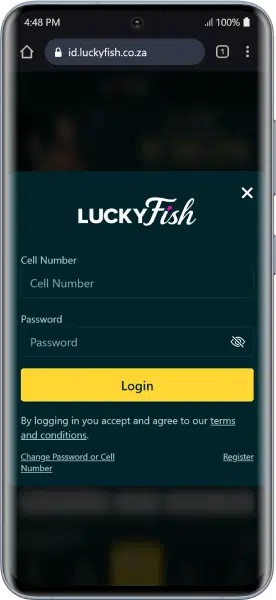
- Enter your registered cellphone number and password.
- Tap Login.
- Enter the OTP sent via SMS if requested.
Once logged in, your balance appears at the top and you can access slots, sports betting, crash games and live casino instantly.
Tip: Use a stable internet connection and ensure you accepted the T&Cs during registration.
Lucky Fish App Login (Android, iOS & Huawei)
For an even smoother experience, Lucky Fish offers a dedicated mobile app that brings all website features into a faster and more responsive interface designed specifically for mobile devices.
Where to Download the App
The Lucky Fish app is available as:
- Android APK
- Apple iOS App Store
- Huawei AppGallery
The app gives instant access to:
- Online slots and table games
- Crash and instant games
- Sports and horse racing betting
- Promotions and bonuses
How to Log in on the App
- Download and install the Lucky Fish app.
- Open the app.
- Tap Log In.
- Enter your cellphone number and password.
- Complete OTP verification if prompted.
Benefits of Using the App
- Faster loading and smoother gameplay
- One-tap account access
- Push notifications for promotions
- Optimised betting interface
- Secure login sessions
Desktop Login
Some players prefer using a larger screen for sports betting or managing their account. The Lucky Fish desktop site offers the same features as mobile, with a wider layout and easier navigation.
Steps for Desktop Login:
- Open Chrome, Edge, Safari or Firefox.
- Go to www.luckyfish.co.za.
- Click Log In in the top-right corner.
- Enter your cellphone number and password.
- Complete OTP verification if required.
You’ll be redirected to the homepage with your balance displayed.
Data-Free Login
Lucky Fish may partner with selected South African mobile networks to provide data-free browsing. This allows players to access key parts of the platform even without mobile data.
How Data-Free Login Works
- Open luckyfish.co.za on a supported network.
- Log in using your cellphone number and password.
- Browse selected sections without using mobile data.
Limitations:
- Some games and live features may require data
- Streaming content may be restricted
- Availability depends on network partnerships
How to Create a New Lucky Fish Account
If you’re new to Lucky Fish, creating an account only takes a few minutes. Lucky Fish Registration gives you access to games, betting markets and welcome bonuses.
Step-by-Step Registration:
- Visit luckyfish.co.za
- Click Join
- Enter:
- Name and surname
- SA ID or passport
- Cellphone number
- Email address
- Password
- Accept T&Cs and submit.
Welcome Bonuses
Lucky Fish rewards new players with a 100% first deposit match worth up to R1,000, plus R50 bonus and 50 free spins. A minimum deposit of R100 is required to qualify, and the bonus carries a 20x wagering requirement. The offer applies to a player’s first ever deposit and runs on both the sportsbook and the casino, so new users get the same bonus whichever side of the platform they start on. 18+, full T&Cs apply.
See the Lucky Fish bonuses page for full details.
Verification & FICA Upload
Before withdrawals, upload:
- SA ID (front & back)
- Proof of address (last 3 months)
Upload via My Account → Documents
Common Login Problems & Solutions
Even though the login process is simple, occasional issues can happen. Below are the most common Lucky Fish login problems and how to fix them quickly without contacting support.
Use Change Password on the login page and reset via SMS or email.
Check:
- Caps lock is off
- Correct cellphone number
- No extra spaces
- Wait 60 seconds before resending
- Check signal and SMS storage
- Clear browser cache
- Switch between Wi-Fi and mobile data
- Try incognito mode
Accounts lock after multiple failed attempts. Wait 30 minutes or contact support.
Customer Support
If you’re unable to access your account after trying the fixes above, Lucky Fish offers multiple support channels available 24/7 to help you recover access safely.
Support Channels:
- Phone: 087 365 0651
- Live Chat: Website chat icon
- Email: [email protected]
- FICA Support: [email protected]
When to Contact Support:
- Lost access to your phone number
- Account locked
- Verification problems
- Password reset not working
Have your ID number and cellphone number ready.
Follow Lucky Fish on Social Media:
Lucky Fish regularly shares promotions, competitions and new game releases on social media. Following their official pages helps you stay updated with the latest offers.
- Facebook: https://www.facebook.com/profile.php?id=61564007185316
- X (Twitter): https://x.com/luckyfishza
- Instagram: https://www.instagram.com/luckyfishza/
Tips for a Secure Lucky Fish Login
Keeping your account secure is essential to protect your funds, bonuses and personal information.
- Use a strong unique password
- Never share OTP codes
- Log out on shared devices
- Avoid public Wi-Fi logins
- Check bet history regularly
- Use phone lock (PIN/biometrics)
FAQ
What is the Lucky Fish login URL?
Visit www.luckyfish.co.za and click Login to access the Lucky Fish login page.
Can I log in to Lucky Fish with email?
No. Lucky Fish login requires your registered cellphone number, not email.
Does Lucky Fish have an app?
Yes. The Lucky Fish app is available for Android, iOS and Huawei, offering full access to your account.
Why do I receive an OTP when logging into Lucky Fish?
Lucky Fish uses OTP verification to protect your account when logging in from a new device or location.
Can I use one Lucky Fish account for casino and sports betting?
Yes. One Lucky Fish account gives you access to all casino games, slots, crash games and sports betting.
Why can’t I log in to my Lucky Fish account?
Common Lucky Fish login issues include incorrect credentials, OTP delays, or temporary account locks after multiple failed attempts.
18+ , T&Cs apply, Play responsibly