


World Sports Betting is one of South Africa’s most popular online betting platforms. This guide will show you how to log in on mobile, desktop, or app, troubleshoot issues, and keep your account secure.
- How to Log in to Your World Sports Betting Account
- World Sports Betting Mobile Login
- World Sports Betting Desktop Login
- How to Create a New World Sports Betting Account
- Common Login Problems & Solutions
- How to Reset Your World Sports Betting Password
- Customer Support
- Tips for a Secure World Sports Betting Login
- FAQ
How to Log in to Your World Sports Betting Account
Accessing your account on the go is simple. WSB supports mobile browser, app & desktop login options, ensuring convenience wherever you are.
World Sports Betting Mobile Login
Mobile Browser (Step-by-Step)
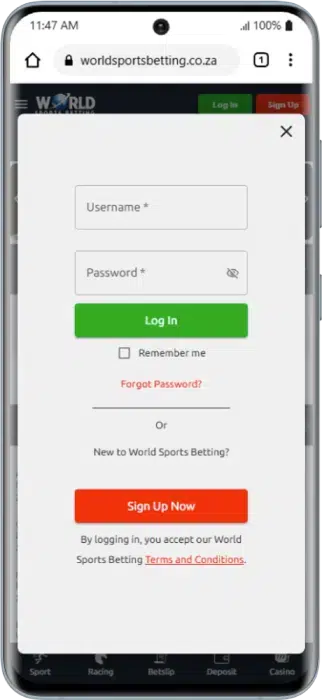
You can log in directly from your mobile browser without installing any app. Follow these steps:
- Visit the official World Sports Betting website using your mobile browser.
- Tap the Login button at the top right corner of the screen.
- Enter your username or phone number and password.
- Tap the green Log In button to access your account.
Tip: Ensure you have a stable internet connection and that you have accepted the latest terms and conditions.
Official App Login (Android, iOS, Huawei)
For a faster and smoother experience, WSB’s official app offers additional features such as push notifications and live betting.
- Download the official World Sports Betting app from Google Play, Apple App Store, or Huawei AppGallery.
- Open the app and tap Login.
- Enter your username/phone number and password.
- Tap Login to access your profile.
App Benefits: Faster loading, push notifications, live betting features, and easy access to data-free mode.
World Sports Betting Desktop Login
Logging in on a laptop or PC gives you full access to all WSB features. Here’s how:
- Open the World Sports Betting website on your laptop or PC.
- Click the Login button in the top-right corner of the homepage.
- Enter your username and password.
- Click Log In to enter your account dashboard.

Data-Free Login
World Sports Betting offers a data-free betting mode, allowing users to log in and place bets without using mobile data.
How to Log In:
- Open the WSB data-free site through the official app or supported network.
- Tap Login and enter your username and password.
- Start betting without consuming mobile data.
Limitations: Some casino games, live streams, and advanced features may not be available in data-free mode.
How to Create a New World Sports Betting Account
If you don’t have an account yet, follow these steps to register to WSB:
- Visit the official World Sports Betting website or app.
- Click Sign Up Now.
- Enter your personal details (phone number, email, address, and date of birth).
- Agree to the terms and conditions and privacy policy.
- Click Sign Up to submit your details.
- Verify your phone number using the SMS verification code.
Welcome Bonuses
New players may qualify for World Sports Betting welcome bonuses, free bets, or promotions depending on current offers.

Verification (FICA Upload)
To withdraw funds, you must verify your account by uploading:
- ID document
- Proof of address
- Proof of payment method (if required)
Common Login Problems & Solutions
Sometimes login issues occur. Here’s how to resolve the most common problems:
Double-check your details or reset your password using the “Forgot Login” option.
Ensure you have a stable internet connection or use data-free mode if available.
Clear your browser cache, try another browser, or use the mobile app.
WSB occasionally performs scheduled maintenance. Wait and try again later.
Your account may be temporarily blocked due to security checks or incorrect login attempts. Contact support for assistance.
How to Reset Your World Sports Betting Password
If you’ve forgotten your password or need to update it for security reasons, follow these steps to reset it.
- Go to the WSB login page and click Forgot Login.
- Enter your registered phone number or email address.
- Follow the instructions sent via SMS or email to reset your password.
- Create a new password and use it to log in to your account.
Customer Support
If you need help with login or account issues, contact World Sports Betting support:
- Live Chat: Available 24/7
- Phone: +27 11 326 3633
- Toll-Free: 0860 10 33 93
- Email: [email protected]
- FICA Support: Use live chat or email for verification-related queries.
When to Contact Support:
- Account blocked
- Password reset issues
- Verification problems
- Technical errors
Tips for a Secure World Sports Betting Login
Keeping your account safe is essential. Follow these best practices:
- Use a strong, unique password.
- Enable two-factor authentication (if available).
- Never share your login details with anyone.
- Log out after using shared devices.
- Avoid public Wi-Fi when accessing your betting account.
FAQ
How do I change my World Sports Betting password?
Log in to your account. Go to Account Settings or Profile. Select Change Password. Enter your old password and create a new one. Save your changes.
What should I do if my account is blocked?
Check your email or SMS for security notifications. Wait a few minutes if blocked due to multiple failed login attempts. Contact customer support via live chat or phone if the issue persists. Complete any required verification if requested.
Can I log in on multiple devices simultaneously?
Yes, WSB allows multiple device access, but be cautious about sharing login details.
How do I recover my account if I forgot my username?
Use your registered phone number or email on the Forgot Login page. Follow the instructions sent to recover your username.
How long does it take to reset my password?
Password resets are usually instant, but it may take a few minutes to receive the SMS or email with instructions.

18+ , T&Cs apply, Play responsibly