



This guide explains how to log in to your Goldrush account on mobile, desktop, and app. You’ll also find troubleshooting tips, security advice, and FAQs to help you access your account quickly and safely. Plus, learn about the Goldrush welcome bonus for new players.
How to Log in to Your Goldrush Account
Goldrush allows you to log in using your username, phone number, or email address along with your password. Follow the steps below depending on your device.
Goldrush Mobile Login
You can log in to Goldrush using your mobile browser or the official Goldrush app.
Mobile Browser Login – Step-by-Step
- Visit the official Goldrush website.
- Tap the Login button at the top of the page.
- Enter your username, phone number, or email address.
- Enter your password.
- Tap Login to access your account.
Tip: Ensure you have a stable internet connection and that you have accepted the latest Goldrush Terms & Conditions.

Official Goldrush App Login (Android, iOS & Huawei)
- Download the official Goldrush app from Google Play, Apple App Store, or Huawei AppGallery.
- Open the app and tap Login.
- Enter your username, phone number, or email address and password.
- Tap Sign In to access your account.
Benefits of the Goldrush App:
- Faster loading and smoother gameplay
- Secure biometric login (if supported)
- Exclusive app notifications and promotions
Goldrush Desktop Login
Logging in on a laptop or desktop computer is simple and similar to mobile.
Desktop Login Steps
- Open your browser and go to the Goldrush website.
- Click the Login button in the top-right corner.
- Enter your username, phone number, or email address.
- Enter your password.
- Click Login to enter your account dashboard.

How to Create a New Goldrush Account
If you don’t have an account, you can register in a few minutes.
Goldrush Registration Steps
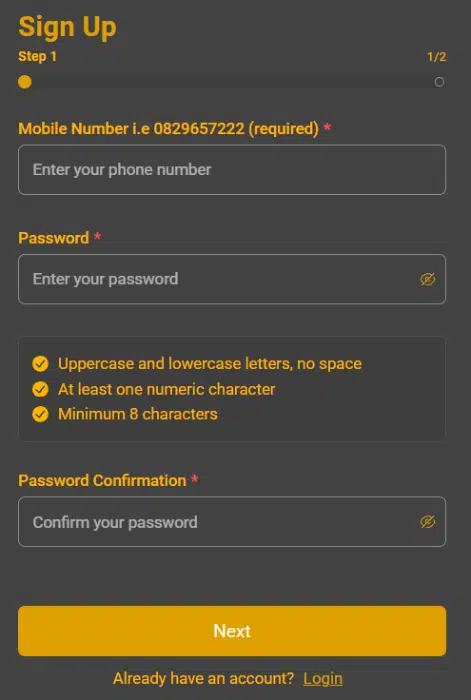
- Visit the Goldrush registration page.
- Enter and verify your phone number via SMS code.
- Create a password and provide your personal details (name, date of birth, email, gender, and income source).
- Enter a promo code (optional).
- Click Sign Up to complete registration.
Goldrush Welcome Bonus
New players can claim a Goldrush welcome bonus up to R25,000 + 300 Free Spins.
Bonus Details:
- Minimum deposit: R25
- Wagering requirement: 30x turnover
- Maximum payout: 10x bonus issued (capped at R100,000)
- Example: First deposit of R10,000 = R10,000 bonus with max payout R100,000; deposit R5,000 = R5,000 bonus, max payout R50,000
- Full T&Cs apply
Verification & FICA Upload
To comply with regulations, you may need to upload FICA documents:
- Proof of identity (ID or passport)
- Proof of address (utility bill or bank statement)
Common Goldrush Login Problems & Solutions
Use the Forgot Password option to reset via SMS or email.
Double-check your login credentials and spelling.
Contact Goldrush customer support for account verification.
Clear browser cache, update the app, or try a different browser/device.
Ensure your internet connection is stable and update the app to the latest version.
Goldrush Customer Support
Need help with your Goldrush account? Support is available 24/7 for any login, verification, or account-related issues.
Ways to Reach Support:
- Live Chat: Tap the chat icon at the bottom left of the website.
- Email: Send a message to [email protected].
- Phone: Call 077 098 4222 for direct assistance.
When to Reach Out:
- Your account has been temporarily blocked or needs verification.
- You have questions about deposits, withdrawals, or bonuses.
- You encounter technical problems that you cannot fix on your own.
Tips for Keeping Your Goldrush Account Secure
- Create a strong password using a mix of letters, numbers, and symbols.
- Activate two-factor authentication if your device supports it.
- Avoid logging in on devices that are shared with others.
- Always log out after using public or shared computers.
- Stay vigilant against phishing attempts or fake Goldrush websites.
FAQ
Can I log in with my phone number?
Yes, Goldrush supports login via username, phone number, or email.
How do I reset my Goldrush password?
Click the Forgot Password link and follow the SMS or email reset instructions.
Why is my Goldrush account blocked?
Accounts may be blocked due to verification issues, suspicious activity, or regulatory requirements. Contact support for assistance.
Is the Goldrush app safe to use?
Yes, the official Goldrush app is secure and offers enhanced login features like biometrics on supported devices.
18+ , T&Cs apply, Play responsibly