



After using the Betway sign up code during Betway registration comes your first Betway login. Follow our guide to see how quick and easy it is to get started with this top-rated betting company.
How to Login at Betway?
The Betway online login is delightfully straightforward. Here’s how to do it via a desktop computer.
- Open Betway South Africa in your preferred browser.
- Of course, to complete the login process, you need an account. If you don’t have one yet, you must sign up. Assuming that the account has been created, you must:
1. Type in your mobile number (no need to include the first zero)
2. Enter your password
3. Click ‘Login’
- Immediately, you’ll be logged in to your account and it’s ready to use. You’ll also receive your Betway account number.
How to Login at Betway Mobile?
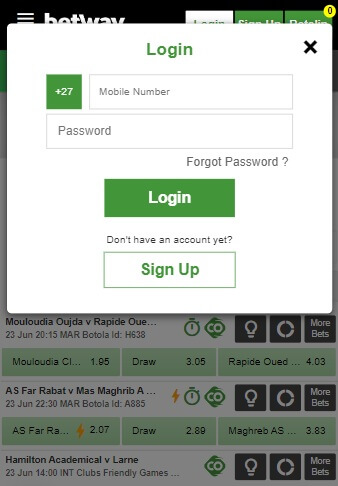
Once you’ve got to grips with the desktop, understanding the Betway mobile login is elementary. Whether you use the mobile web or the Betway app, the process is the same. Here’s a quick guide:
Step 1:
Go to the website or open the mobile app.
Step 2:
Tap the white ‘Login’ button.
Step 3:
Enter your mobile number and your password. Then, click the Betway Login button.
Step 4:
You’re ready to bet with Betway.
Betway Data Free Login
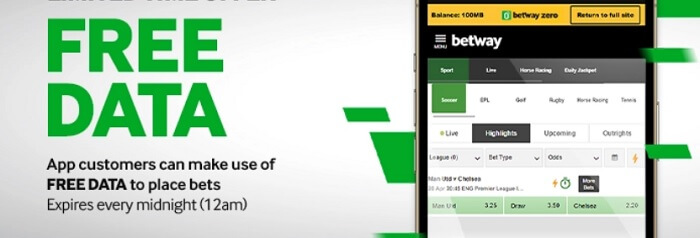
At Betway South Africa, players can check their accounts via USSD. Use this guide as a tutorial:
Step 1:
From your mobile device, dial *120*48463#
Step 2:
On the screen, you’re presented with 5 options – (1) Register, (2) Deposit, (3) Bet, (4) My Account, and (5) Withdraw.
Step 3:
By selecting option ‘4’, you can view your account balance and active bonuses, which is effectively your Betway data free login. To place a bet via USSD, enter number 3 on your keypad and follow the steps provided.
Common User Login Issues
Even experienced bettors can run into technical hurdles. If you are having trouble accessing your account, check this list of common problems and their quick fixes:
- Location Services: Betway requires your GPS to be active to verify you are in a legal betting region.
- Incorrect Credentials: Double-check your username and password for typos. Remember that passwords are case-sensitive.
- Forgotten Password: Use the “Forgot Password” link on the login page to receive a reset code via SMS or email.
- Account Lockouts: Multiple failed attempts may temporarily lock your account. Wait a few minutes or contact support to unlock it.
- Browser Cache Issues: Outdated data in your browser can cause loading errors. Try clearing your cache and cookies or using a different browser.
- App Updates: If you are using the mobile app, ensure it is updated to the latest version to avoid compatibility bugs.
Tips For Keeping Your Betway Password Safe
Protecting your account is just as important as choosing the right bets. Use these security practices to keep your funds and personal data secure:
Create a unique password that mixes uppercase letters, lowercase letters, numbers, and symbols. This variety makes it significantly harder for automated “brute-force” programs to guess your credentials.
Whenever possible, activate 2FA. This adds a second layer of security by requiring a code sent to your mobile phone, ensuring that even if someone knows your password, they cannot access your funds.
Hackers often monitor public Wi-Fi in cafes or airports to intercept data. Always use a secure, private home connection or your mobile data when logging into your Betway account.
Be wary of phishing attempts. Remember, Betway staff will never ask for your password via email, SMS, or social media. If someone asks for your login info, report it immediately.
Get into the habit of changing your password every few months. This practice minimizes the risk of a long-term breach and ensures your account remains accessible only to you.
Betway Customer Support
If you cannot resolve a login issue on your own, the Betway South Africa support team is available 24/7. Whether you have a technical bug or need to submit FICA documents, you can use the following official channels:
- Live Chat: The fastest way to get help. Access it via the “Help” or “Contact Us” section on the website and app for real-time troubleshooting.
- Phone Support: Call the official helpline at 0861 787 250 to speak directly with an agent.
- Email Support: Send detailed queries or documents to [email protected]. This is ideal for complex issues that require screenshots.
- USSD Service: A great option for users with older mobile devices or limited data. Use the Betway USSD code to manage basic account queries without an internet connection.
- Social Media: Follow or message their official profiles for updates and assistance:
- Facebook: @Betway_za
- X (Twitter): @BetwaySouthAfrica
FAQ
That’s how simple the Betway online login process is. To finish off, we’ve added some important FAQs.
The only information on Betway’s website related to resetting a customer password is via the online method. This involves opening the website, tapping the ‘Login’ button followed by the ‘Forgot Password’ link. You can then set a new password. Unfortunately, it doesn’t appear as though a password can be reset via SMS.
Your Betway login number is the mobile telephone number that you provided when you set up the account. You can update your details by logging into your account and clicking on Settings > Edit. After you’ve updated your phone number, this will (by default) become your new Betway mobile login number too.
You can only have one Betway South Africa account. If it’s discovered that you have more than one account, i.e. multiple accounts tied to the same mobile number, bank account, or residential address, then you’re likely to have them all suspended.
There are a few reasons why you may not be able to log in at Betway. Firstly, we suggest checking your internet connection and its speed. If everything is good on your end, the issue could be that Betway is down. This might be scheduled maintenance or an outage. You can always contact customer support or view Betway’s social media channels for more information.
18+ , T&Cs apply, Play responsibly